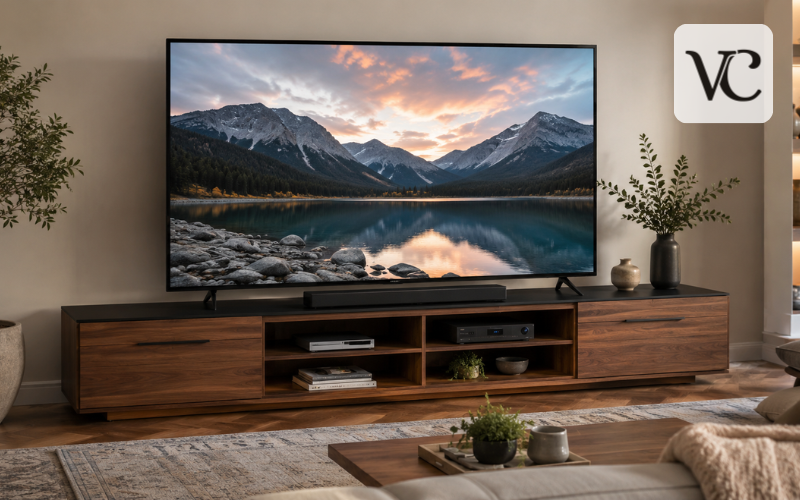
A 75 inch TV stand is more than a piece of furniture placed under a large television. It needs to support the TV safely, fit the room properly, provide enough surface space for the TV base, and often store media equipment as well. Because a 75-inch screen is large, choosing a stand by appearance alone can lead to poor balance or an awkward setup.
The “75-inch” label describes the television’s diagonal screen measurement, not its full width. Samsung notes that a typical 75-inch TV is about 65 to 66 inches wide, although exact dimensions vary by model and bezel design.
For most buyers, the main things to check are stand width, TV-foot placement, weight capacity, storage, viewing height, material, and style. A good 75 inch TV stand should make the television feel secure and visually balanced while fitting naturally with the rest of the room.
Short Snippet-Ready Definition:
A 75 inch TV stand is a wide media console designed to support or sit beneath a 75-inch television, offering suitable width, stability, storage, cable management, and balanced placement for a large-screen setup.
Quick Guide: 75 Inch TV Stand
| Feature | Practical Guide |
| Recommended Width | Around 70–80 inches for many 75-inch TVs |
| TV Width | Usually about 65–66 inches, depending on model |
| Depth | Must fully support the TV feet or pedestal base |
| Weight Capacity | Should exceed the TV’s actual weight |
| Storage | Allow space for consoles, routers, receivers, and remotes |
| Soundbar Space | Check soundbar width before choosing the stand |
| Materials | Solid wood, veneer, MDF, metal, or mixed materials |
| Popular Finishes | Black, white, oak, walnut, and natural wood |
| Safety | Use stable construction and anti-tip anchoring where required |
Simple Steps for Choosing a 75 Inch TV Stand
- Measure the television’s actual width, not just its diagonal screen size.
- Measure the distance and depth of the TV feet or pedestal.
- Choose a stand wide and deep enough to support the entire TV base.
- Check the stand’s maximum weight capacity.
- Consider viewing height, storage, cable management, and ventilation.
- Measure the available wall and floor space before ordering.
- Compare materials and finishes only after confirming proper fit and support.
75 Inch TV Stand Size: Finding the Right Width, Height, and Depth
For many 75-inch televisions, a console around 70 to 80 inches wide is a useful starting point. This usually gives a TV that is roughly 65 to 66 inches wide some extra space on each side. However, 70 to 80 inches should not be treated as a fixed rule. The right 75 inch TV stand size depends on the exact television and how it will be installed.
Width is the first measurement to check. If the TV will sit directly on the furniture, the stand must be wide enough for the complete base or both TV feet. A stand slightly wider than the television can also create a cleaner, more balanced look.
Depth matters too. Wide-set TV feet may extend farther forward and backward than expected, so the usable top must be deep enough for them. Height affects comfort because a very tall console can push the screen above a comfortable eye line.
The safest approach is to consider width, depth, and height together rather than relying only on a label that says “fits TVs up to 75 inches.”
Measure Your 75-Inch TV Before Buying the Stand
Before shopping, measure the television itself. Start with the full outer width from the far left edge to the far right edge. Do not calculate the stand size from the 75-inch diagonal measurement because that number does not tell you the actual width of the frame.
Next, measure the TV feet. If the television has two separate legs, measure from the outside edge of one foot to the outside edge of the other. Also measure how deep the feet are. If the TV has a central pedestal, measure the full width and depth of that base.
Then measure the room. Check the wall width, nearby cabinets or doors, electrical outlets, and the space required for a soundbar or speakers. If the stand will sit between other furniture, leave enough room so the setup does not feel squeezed.
These measurements make it much easier to compare products accurately and avoid buying a stand that looks suitable online but does not work in the room.
75 Inch TV Stand Legs, TV Feet, and Base Compatibility
The phrase 75 inch TV stand legs can mean two different things: the feet attached to the television and the legs supporting the furniture. Both matter, but they serve different purposes.
The TV feet or pedestal determine whether the television can sit safely on the top surface. The entire base must fit on the stand, with no part hanging over the front, back, or sides. Some 75-inch TVs offer more than one foot position, which is another reason to check the manual or official specifications for the exact model.
The furniture legs support the console itself. They should be firmly attached, level, and strong enough for the stand plus everything placed on it. Long consoles can carry a large amount of weight across a wide span, so correct assembly is important.
If the TV feet are too wide for a stand you already own, do not balance them near the edges. A properly sized console, a compatible replacement TV base, or a correctly installed wall mount is a better solution.
Weight Capacity, Stability, and Safety
A stand can be wide enough for a 75-inch TV and still be unsuitable if it cannot safely carry the television’s weight. Always compare the TV’s actual weight with the maximum TV weight or top-load rating listed by the furniture manufacturer. Also allow for any equipment placed on the same surface.
Stability is equally important. Assemble the stand as instructed, tighten the hardware properly, and place it on a firm, level floor. If the console uses adjustable feet, set them so the furniture does not rock.
Tip-over prevention matters especially in homes with children. The U.S. Consumer Product Safety Commission advises using furniture designed to hold televisions, following manufacturer instructions, and securing TVs and furniture against tip-over hazards.
If anchoring hardware is supplied or recommended, use the correct fasteners for the wall type and follow the instructions carefully.
Choosing a Comfortable TV Stand Height
The ideal TV stand height depends on where people sit and where the screen will be positioned. In a comfortable setup, viewers should be able to watch without constantly tilting their heads upward or downward.
Start by sitting in the main viewing position and noting your natural eye level. Then consider where the center of the screen will sit. Sofa height, viewing distance, TV size, and personal comfort all affect the final position, so there is no single stand height that suits every room.
If the 75-inch TV sits directly on the console, both the furniture height and the TV base affect the screen position. A lower media console often works well with a large television because the screen itself is already tall.
A wall-mounted TV gives more flexibility, but avoid mounting it unnecessarily high just to create a large gap above the furniture. Comfortable viewing should come before decoration.
Storage, Cable Management, and Space for Media Devices
A 75 inch TV stand often becomes the main storage point for an entertainment setup. Think about what needs to fit inside before choosing a design. Gaming consoles, streaming boxes, receivers, routers, controllers, remotes, and other devices can quickly use more space than expected.
Open shelves make equipment easy to reach and can improve airflow. Closed cabinets create a cleaner appearance, but devices that produce heat still need ventilation. Check that the design allows warm air to escape when electronics are in use.
Cable management is another useful feature. Rear openings or cable channels help route power and HDMI cables without creating a visible bundle behind the stand. Check outlet positions as well so the console does not block an important socket.
If you use a soundbar, measure it before buying. It may sit on the top surface, inside an open shelf, or below a wall-mounted TV. Planning for it early usually creates a much neater setup.
75 Inch TV Stand Wood Options and Material Choices
A 75 inch TV stand wood design can make a large television feel warmer and more connected to the room. Solid wood offers natural grain and a substantial feel, but it is often heavier and more expensive. Wood veneer can provide a natural look at a different price point.
Engineered wood and MDF are common in modern TV furniture because they can be shaped into wide cabinets and smooth painted finishes. Quality varies, so material type alone does not tell you how strong a stand is. Load capacity, hardware, panel construction, and assembly quality are more useful indicators.
Oak and light natural finishes tend to create an airy, relaxed look. Walnut and darker woods can make the entertainment area feel warmer and richer. Fluted fronts, rattan panels, and mixed wood-and-metal designs can add texture.
When comparing materials, consider durability, weight capacity, cleaning, scratch resistance, moving difficulty, appearance, and budget.
Black vs White 75 Inch TV Stand
A 75 inch TV stand black finish works well when you want the television and console to form one strong visual area. Because most TV screens and bezels are dark, black furniture can help the equipment blend together. It also suits modern and industrial interiors.
A 75 inch TV stand white finish has a lighter effect. It can make a large media wall feel less heavy and works well with pale walls, bright rooms, or Scandinavian-inspired spaces. White also provides a clean contrast beneath a dark screen.
Maintenance should influence the choice. Glossy black surfaces may show dust, fingerprints, and fine marks, while white finishes can make dirt or scuffs more visible. Matte and textured surfaces are often easier to live with.
Consider the furniture already in the room, wall color, flooring, and how often you change decor. A finish that works with several colors can remain useful for longer.
Modern, Mid-Century, Farmhouse, and Floating Designs
Style matters because a 75-inch television takes up a large amount of visual space. The stand can either soften that presence or make it a stronger feature of the room.
Modern and minimalist consoles usually use clean lines, simple fronts, and limited visible hardware. Floating units can make the floor area feel more open and work especially well with wall-mounted televisions, but they must be installed on a suitable wall using the correct mounting method.
Mid-century designs often feature warm wood, tapered legs, and simple cabinet shapes. Boho-inspired units may include rattan or woven panels, while fluted fronts add texture. Farmhouse stands often use heavier wood finishes or framed doors, and industrial designs may combine metal with wood and open shelving.
Whichever style you prefer, function should come first. A beautiful console is not suitable if the TV feet do not fit, the top cannot support the load, or electronics have poor ventilation.
75 Inch TV Stand IKEA Options and Sizing Checks
If you are considering a 75 inch TV stand IKEA option, check the exact measurements rather than assuming every wide TV unit is intended for a 75-inch screen. IKEA’s current U.S. BESTÅ range includes TV units measuring about 70 7/8 inches wide. A current BESTÅ TV unit lists a maximum TV weight of 66 pounds and states that the bench suits a TV up to 72 inches, while noting that a larger TV may be possible if it stays within the specified maximum load.
This shows why width and product labeling need to be considered together. A 70 7/8-inch console may be physically wider than many 75-inch TVs, but you still need to check the television’s weight, foot spacing, stand depth, and installation requirements.
BESTÅ is modular, so storage layouts, doors, drawers, shelves, and legs can vary. Availability and specifications can also differ by country or change over time. Check the current local IKEA product page and assembly instructions before buying.
Finding a 75 Inch TV Stand Nearby or on Sale
Searching for a 75 inch TV stand nearby can be helpful if you want to see the finish and proportions in person or avoid long delivery times. Before visiting a store, check local stock where possible and save the exact product dimensions. A stand that looks large in a showroom can feel very different under a 75-inch screen.
Shopping locally also lets you inspect color, texture, doors, drawers, and general build quality. If you plan to collect a boxed unit yourself, check the package size and weight before traveling.
When comparing a 75 inch TV stand sale, focus on value rather than the discount percentage alone. Confirm that the stand still meets your width, depth, load capacity, and storage requirements. A low price is not useful if the TV feet do not fit or the console cannot safely support the television.
Compare the full cost, including delivery, assembly, extra shelves, doors, legs, wall anchors, or other accessories. Return conditions are worth checking too because sending back a long, heavy piece of furniture can be difficult.
75 Inch TV Stand Buying Checklist
Before ordering, do one final check against the television and room. Two products advertised for a “75-inch TV” can have very different measurements and load limits.
- Confirm the TV’s full width and actual weight.
- Measure the outside spacing and depth of the TV feet or pedestal.
- Check the stand’s width, usable top depth, and height.
- Confirm the maximum TV weight or top-load capacity.
- Allow enough space for a soundbar and media devices.
- Check cable openings and ventilation.
- Decide whether you need open shelves, drawers, or closed cabinets.
- Review the material, finish, furniture legs, and assembly requirements.
- Check anchoring or wall-mounting instructions where applicable.
- Measure the wall and nearby furniture before ordering.
This final check is more reliable than choosing by the advertised screen size alone.
Conclusion
The right 75 inch TV stand should fit the television, the room, and the way you use your entertainment area. Start with the TV’s actual width, base or foot spacing, depth, and weight. Then choose a console that provides safe support, comfortable screen placement, useful storage, and enough visual space around the television.
A width of roughly 70 to 80 inches is a practical starting point for many 75-inch TVs, but the exact model measurements should guide the final choice. Materials, colors, and design styles can help the stand fit your interior, yet they should come after stability and everyday function.
Whether you prefer wood, black, white, minimalist, farmhouse, mid-century, floating, IKEA, or another style, measure both the television and the available room space first. That simple step makes it much easier to choose a stand that looks balanced, works well, and remains practical over time.
FAQs
What size TV stand do I need for a 75-inch TV?
A stand around 70–80 inches wide works well for many 75-inch televisions. However, always check your TV’s actual width, foot spacing, depth, and weight before choosing a console.
Can a 75-inch TV fit on a 65-inch TV stand?
It may physically fit if the TV feet remain fully supported, but a narrow stand can look unbalanced. A wider console usually provides better stability, proportions, and usable surface space.
How wide is a typical 75-inch television?
Most 75-inch televisions are roughly 65–66 inches wide, although exact dimensions depend on the manufacturer, bezel, and model. Always check the official product specifications before buying furniture.
Is a wall-mounted 75-inch TV stand still necessary?
A stand is not required for physical TV support when wall-mounted, but it can provide storage, hide cables, hold a soundbar, and create a visually balanced entertainment area.
Is wood or MDF better for a 75 inch TV stand?\
Both can work well. Solid wood is often heavier and durable, while quality MDF can be affordable and stylish. More importantly, check construction quality and the manufacturer’s stated weight capacity.
Disclaimer: This article provides general guidance for choosing a 75 inch TV stand. Television dimensions, foot spacing, weight, furniture load limits, and installation requirements vary by model and manufacturer. Always check the official specifications and assembly instructions for both your TV and stand before purchasing or installation. Use recommended wall anchors or anti-tip hardware where required, especially in homes with children or pets.
Enjoyed this article? Discover more helpful ideas and fresh inspiration on Vogue Cultures.