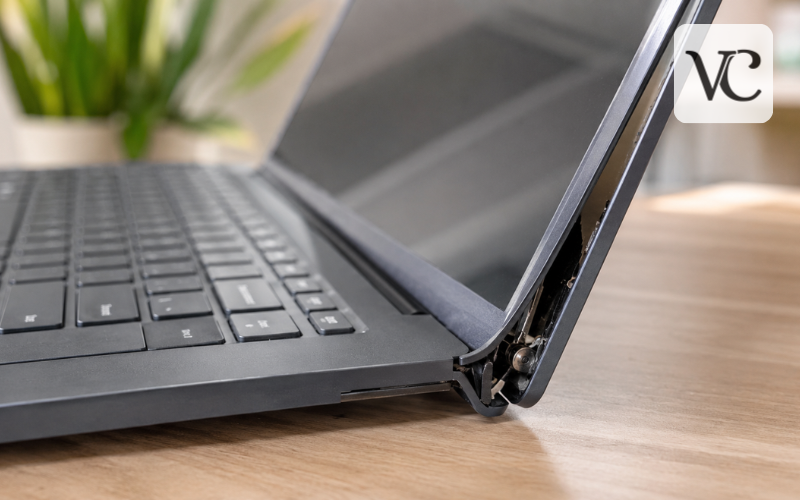
A laptop bezel is the border around the visible screen. On many laptops, it is a thin plastic frame, although some modern models use glass, adhesive trim, or integrated display parts. Depending on the design, it can cover clips, screws, cables, camera parts, and the edges of the display assembly. Manufacturer service manuals show that bezel construction varies considerably between laptop models.
A cracked laptop bezel may appear as a small split in one corner, a loose section that lifts away from the screen, a border that peels back, or a gap that opens when the lid moves. Some damage is mostly cosmetic. Other damage can be a warning that a hinge, hinge mount, rear display cover, or another part underneath is under stress.
That difference matters because the wrong repair can make a small problem worse. A stable crack may need only temporary stabilization, while a bezel that separates as the lid moves may require hinge or display-cover repair first.
This guide covers diagnosis, temporary fixes, laptop bezel replacement, rubber-strip problems, repair cost, and when professional help makes sense.
Snippet-Ready Definition:
A cracked laptop bezel is damage to the plastic, glass, or trim frame surrounding a laptop screen. It may be cosmetic or indicate problems with the hinges, display cover, clips, or mounting points.
Quick Guide: Cracked Laptop Bezel
| Situation | Likely Issue | Recommended Action |
| Small stable crack | Cosmetic bezel damage | Monitor or temporarily secure it |
| Bezel lifts when lid moves | Hinge or mounting damage | Stop forcing the lid and inspect it |
| Border peeling away | Loose clips, adhesive, or trim | Identify the loose part before repairing |
| Screen shows lines or black spots | Possible display panel damage | Have the screen inspected |
| Bezel is broken or badly warped | Physical bezel damage | Replace the correct bezel |
| Rubber strip is loose | Gasket or trim problem | Check whether it is separately replaceable |
What to Do if Your Laptop Bezel Cracks
- Check the actual screen for cracks, lines, black spots, flickering, or image distortion.
- Open the lid slowly and watch whether the damaged bezel moves or separates.
- Check the hinges for stiffness, popping sounds, or uneven movement.
- Avoid forcing the bezel back if it keeps coming loose.
- Use temporary tape only for a small, stable crack until a proper repair can be made.
- Find the exact laptop model before ordering a replacement bezel.
- Consider professional repair if the hinge, rear cover, touchscreen, or display panel is also damaged.
What a Laptop Bezel Does and Why Damage Matters
The bezel forms the front border of the display assembly. It may surround the webcam and microphones and cover areas where the panel, rear lid, hinges, and cables meet.
Laptop makers do not all build bezels in the same way. Even models from the same brand may use different fastening methods. For example, Dell service manuals show some bezels secured with screws and others attached with clips and adhesive. One Latitude procedure warns that the bezel is adhered to the display panel and must be released carefully to avoid damaging the panel, while another model uses screws beneath protective covers.
Because the bezel is part of the wider display structure, damage should not automatically be dismissed as a cosmetic flaw. If a stiff hinge or damaged mounting point is pushing the frame outward, replacing only the visible bezel may not correct the real cause.
Cracked Laptop Bezel vs. Cracked Laptop Screen
A cracked bezel and a cracked screen are different problems. The bezel is the border around the display, while the screen panel produces the image.
If the picture looks normal and the damage is limited to the outer border, the LCD may still be working properly. Typical bezel damage can include chipped plastic, a split near a corner, a loose border, or a section that no longer sits flat.
Actual panel damage usually produces different symptoms. HP notes that a damaged LCD can show lines, unusual patterns, or black spots, while Dell includes lines, flickering, and cracked glass among display problems that can be diagnosed through screen testing.
People searching for how to fix a cracked laptop screen without replacing it should therefore first identify which part is broken. A physically cracked LCD or OLED panel cannot normally be restored by repairing the bezel, applying tape, using software, or adding glue. Lenovo specifically describes a cracked OLED panel as permanent physical display damage.
If only the surrounding bezel is cracked and the image remains normal, however, replacing the bezel may solve the problem without replacing the working screen.
Check the Hinges Before Trying to Fix the Bezel
Cracks near the lower corners deserve extra attention because these areas are often close to the hinges. Open the lid slowly and watch the damaged section. Normal movement should feel smooth and controlled.
Warning signs include unusual resistance, popping or cracking sounds, one side moving differently from the other, a gap that becomes wider as the lid opens, or the bezel lifting near a hinge. These symptoms may point to damaged hinge hardware or broken mounting points inside the display cover.
Manufacturer repair documentation also shows how closely display components can be related. Lenovo maintenance information includes the LCD bezel, hinge area, cables, and related display components within the same service assembly procedures.
If the bezel clearly separates whenever you move the lid, avoid repeatedly opening and closing the laptop. Continued movement can place more stress on the frame and nearby display parts. The hinge area should be inspected before trying to glue or snap the bezel back into place.
Common Reasons a Laptop Bezel Cracks or Separates
A bezel can crack after a drop, an impact to the lid, or pressure from other objects inside a bag. Carrying a laptop by the display instead of supporting the base can also place unwanted stress on the lid and surrounding frame.
With age, plastic clips can weaken, adhesive can lose its grip, and repeated lid movement can stress thin borders. Modern narrow bezels can also leave less surrounding material around the screen than older, thicker designs.
Hinge problems are another possible structural cause. If a hinge becomes unusually stiff, more force is transferred into surrounding parts each time the lid moves. Damage to the points where the hinge attaches to the display cover can create similar separation.
Previous repairs can matter too. Poor fit, missing clips, reused adhesive, or a slightly incorrect replacement part can leave the bezel under tension. Manufacturer parts catalogs confirm that bezels, hinge covers, hinges, and adhesives may be supplied as separate or related components depending on the model.
What to Do Immediately After Finding a Cracked Bezel
Before repairing anything, inspect the bezel, screen, rear lid, both hinges, and any gaps. Move the lid only as much as necessary to see whether the crack changes.
A short safety check can help:
- Make sure loose plastic is not pressing directly against the display.
- Stop moving the lid if the bezel lifts sharply or the hinge feels unusually stiff.
- Do not repeatedly snap a loose corner back into position.
- Back up important files if the damage is worsening and the laptop may need to be dismantled for repair.
A normal picture is a good sign, but it does not prove the problem is harmless. The goal is to limit unnecessary movement and determine whether the damage affects only the border or also involves a hinge, rear cover, or display panel.
How to Fix a Cracked Laptop Bezel Temporarily
A temporary repair makes sense only when the crack is small, the bezel stays in position, and the hinges move smoothly. A small piece of suitable tape can help prevent a loose plastic edge from catching on a laptop sleeve, clothing, or other objects until proper repair is possible.
Tape should be treated as stabilization rather than a structural repair. Avoid covering the webcam, microphones, ventilation openings, or moving hinge parts. Do not pull the bezel tightly toward the screen, as excessive pressure can place stress on the display.
Glue needs greater caution. Liquid adhesive can run through gaps and reach the panel, camera area, cables, or surfaces that may later need to be separated for service. Strong adhesive may also make future repairs harder.
A cosmetic patch should never be used to hide an obvious hinge problem. If the frame is repeatedly forced apart by lid movement, the mechanical cause needs attention first.
Cracked laptop bezel Reddit discussions can provide useful owner experiences, but they should not replace service instructions for the exact laptop. Manufacturer manuals may specify particular screws, clips, adhesive, and safe opening directions.
Laptop Bezel Coming Off or Screen Border Peeling Away
A laptop bezel coming off is not always the same as a cracked bezel. The frame may still be unbroken but no longer attached correctly. Released clips, weakened adhesive, deformation, impact damage, or movement around a hinge can all cause separation.
If the laptop screen border is peeling off, identify exactly what is loose. It may be the main bezel, a narrow trim piece, rubber gasket, adhesive strip, or part of a hinge cover.
Simply pressing the edge back into position may work briefly if a clip has released, but repeated separation usually deserves closer inspection. Dell service documentation shows why there is no universal solution: some bezels use adhesive during removal, while other replacement bezels are designed to snap back into the display assembly.
If pressing the border causes visible screen distortion, unusual clicking, or movement near the hinge, stop applying pressure and inspect the underlying assembly.
Laptop Screen Rubber Strip and Bezel Gasket Problems
The laptop screen rubber strip is usually a soft gasket, bumper, or trim around part of the display. Depending on the model, it may cushion the closed lid, cover an edge, or help finish the screen border.
A loose rubber strip behaves differently from a cracked rigid bezel. Rubber or flexible trim may stretch, shrink, peel away, tear around a corner, or lose its adhesive even though the hard frame remains intact.
On some laptops, the gasket or trim can be replaced independently. On others, it may be supplied with the bezel, display cover, or another part. HP parts documentation, for example, shows model-specific display components in which bezels, hinge pieces, and adhesive materials can be packaged differently.
Be particularly careful with thin glass-front displays and integrated assemblies. A simple-looking strip can sit close to fragile display layers or cables, so check the model-specific service instructions before pulling it away.
Laptop Bezel Replacement: What the Repair Involves
Laptop bezel replacement is usually a better long-term solution when the frame is badly cracked, warped, missing pieces, or no longer stays attached.
A typical repair starts by identifying the exact laptop model and shutting it down. Power should be disconnected according to the manufacturer’s procedure. The repair then involves accessing any hidden screws or clips, releasing adhesive where necessary, carefully removing the damaged bezel, checking the surrounding display and hinge components, and installing the replacement.
There is no single removal method. Dell service documentation shows designs using screws, adhesive, clips, or combinations of these. It also warns that incorrect prying can put damaging pressure on the display panel.
Touchscreen laptops, ultra-thin notebooks, glass-front displays, and highly integrated display assemblies may require a more involved repair. In these designs, what appears to be a simple border may not be intended to be replaced like a basic snap-on plastic bezel.
For this reason, check the official service manual for the exact laptop before beginning disassembly.
Finding the Correct Bezel, Parts, and Repair Materials
Do not choose a replacement bezel using only the laptop brand and screen size. Two laptops with the same screen measurement can use different parts because of webcam positioning, microphone holes, privacy shutters, touchscreen options, color, finish, or display configuration.
Start with the full model number, product number, machine type, or service tag. Then check whether the required part is actually the front bezel rather than the rear display cover, hinge cover, rubber gasket, LCD panel, or complete display assembly.
Small design details can matter. Dell notes for one Latitude model that the camera shutter must be transferred to the replacement bezel, showing why appearance alone is not enough when selecting a part.
Tools should also match the manufacturer’s procedure. Small screwdrivers and non-metallic opening tools are common, but the exact requirements vary. If replacement adhesive is needed, use the appropriate type and placement rather than simply choosing the strongest glue available.
Laptop Bezel Repair Cost and When Professional Repair Makes Sense
Laptop bezel repair cost varies too much for one price to fit every laptop. A bezel-only repair may be fairly straightforward, while broken hinge mounts, a damaged rear lid, display cables, touchscreen glass, or the LCD panel can add parts and labor.
Part availability can also change the total. Some models have easy-to-find separate bezels, while others may require scarce parts or larger display assemblies. HP documentation, for instance, shows display assemblies that may be available either as complete units or as individual subcomponents depending on the laptop.
DIY repair is most practical when the screen works properly, the hinge is healthy, the exact bezel is available, and the manufacturer provides a clear procedure that matches your skill level. Professional repair is generally safer for stiff hinges, moving gaps, glass or touchscreen displays, exposed cables, or uncertain damage.
Check warranty or accidental-damage coverage before opening the laptop. Coverage varies by manufacturer, model, country, and cause of damage. Apple, for example, directs MacBook owners to model- and coverage-specific service information rather than using one universal repair price.
Repair Mistakes to Avoid and How to Prevent Another Cracked Bezel
One of the biggest mistakes is assuming every loose bezel only needs glue. If a hinge is forcing the frame apart, adhesive may hide the symptom without removing the stress. The crack or separation can return.
Do not force a lid that feels stiff, twisted, or uneven, and avoid prying directly against the LCD or glass. Manufacturer service instructions warn that careless bezel removal can place harmful pressure on the display panel.
Ordering the wrong bezel is another avoidable problem. Match the complete laptop model and display configuration rather than relying only on the brand name or screen size.
For everyday prevention, open the lid from the center when practical so force is distributed more evenly. Carry the laptop by its base rather than by the display, use a protective sleeve during transport, and avoid placing heavy objects against the closed lid.
Pay attention to hinge movement as the laptop ages. If a hinge suddenly becomes noticeably tighter, uneven, or noisy, dealing with it early may prevent extra stress from reaching the bezel and rear display cover.
Conclusion
A cracked laptop bezel can be a minor cosmetic issue, but it can also be the visible sign of damage involving a hinge, rear cover, mounting point, rubber gasket, or display panel. The most important first step is to identify what moves when the lid opens and whether the actual screen remains healthy.
A small, stable crack combined with smooth hinge movement may only need temporary stabilization until the bezel can be replaced. A frame that lifts, pops, or separates near a stiff hinge requires closer inspection before any cosmetic repair is attempted.
Laptop display construction varies significantly between models, as current manufacturer service documentation shows, so model-specific repair instructions are more reliable than a one-size-fits-all method.
Protect the working display, avoid unnecessary force, identify the exact damaged part, and fix the underlying cause rather than simply hiding the crack. That approach gives you the best chance of repairing the bezel without turning a manageable problem into a more serious display repair.
FAQs
Can I keep using a laptop with a cracked bezel?
You can often continue using it if the crack is small, stable, and the hinges and screen work normally. However, widening gaps or hinge movement should be inspected before the damage becomes worse.
Can a cracked laptop bezel be repaired without replacement?
Minor cosmetic cracks may sometimes be temporarily stabilized with suitable tape. Larger cracks, missing pieces, warped plastic, or repeated separation usually make laptop bezel replacement a more reliable long-term solution.
Does a cracked bezel mean the laptop screen is broken?
Not necessarily. If the image remains clear and normal, the LCD may be undamaged. Lines, black patches, visible panel cracks, flickering, or distorted images are stronger signs of actual screen damage.
Why is my laptop bezel coming off near the hinge?
A bezel lifting near a hinge may result from broken clips, failed adhesive, damaged hinge mounts, or a stiff hinge placing pressure on the display frame. Avoid repeatedly moving the lid until checked.
How much does laptop bezel repair cost?
The cost depends on the laptop model, replacement-part price, labor, and whether the hinge, rear cover, or screen is also damaged. A bezel-only repair is usually simpler than structural display repairs.
Disclaimer: This information is intended for general guidance only. Laptop display designs and repair procedures vary significantly by brand and model. Before removing a bezel or opening the display assembly, check the manufacturer’s service instructions and warranty terms. If the hinge is stiff, the screen is damaged, cables are exposed, or you are unsure about disassembly, consider using a qualified repair technician to avoid causing additional damage.
Enjoyed this article? Discover more helpful ideas and fresh inspiration on Vogue Cultures.