
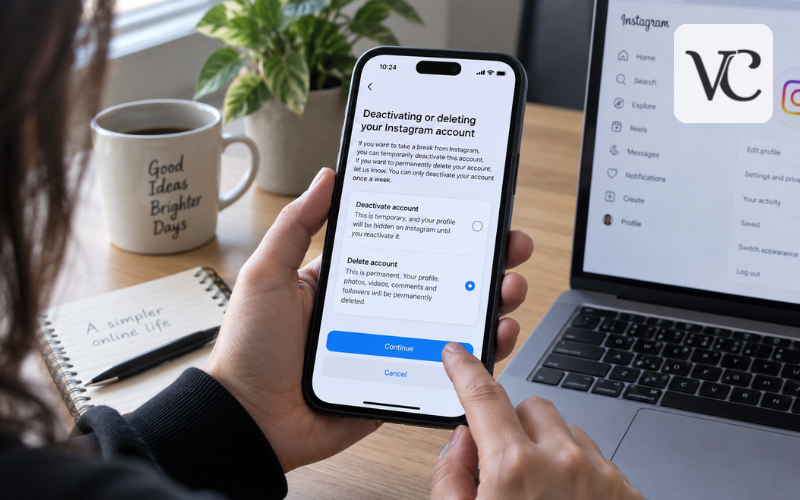
If you are wondering how to delete Instagram account, the process is now handled mainly through Meta Accounts Center. You can permanently delete an Instagram account from the Instagram app on your phone or by using Instagram on a computer. Meta’s current guidance confirms that permanent deletion can be requested from either a phone or computer.
Deleting your account is different from simply removing the Instagram app from your device. Permanent deletion starts the process of removing your profile and the information connected with it. If you only want some time away, Instagram also offers temporary deactivation, which hides your account without permanently removing it.
This guide explains the current 2026 Instagram and Meta account-management process for Android, iPhone, and desktop. It also covers what you should do before deleting your account, what happens afterward, and what to try if you cannot log in.
Snippet-Ready Definition:
Deleting an Instagram account means permanently removing your profile and account data through Meta Accounts Center. voguecultures.co.uk only provides informational guidance about how to delete Instagram account and nothing else.
Quick Guide Table
| Option | What It Does | Best For | Permanent? |
| Delete Instagram account | Removes your account and associated profile data after the applicable deletion period | People who no longer want their account | Yes |
| Temporarily deactivate | Hides your account until you return | People who only want a break | No |
| Delete Instagram app | Removes the app from your phone only | Freeing device space or stopping app use | No |
| Log out | Signs you out without changing the account | Temporarily leaving Instagram | No |
Quick Steps to Delete an Instagram Account
- Open Instagram and go to your profile.
- Tap the menu and open Accounts Center.
- Select Personal details.
- Open Account ownership and control.
- Choose Deactivation or deletion.
- Select the correct Instagram account.
- Tap Delete account and choose Continue.
- Follow Instagram’s confirmation instructions to submit the deletion request.
Menu names or positions may vary slightly depending on your device and Instagram app version.
How Instagram Account Deletion Works
Permanently deleting Instagram is an account-level action. According to Instagram’s Help Center, deleting your account permanently removes your profile, photos, videos, comments, likes, and followers. If you only want to take a break, Instagram recommends temporary deactivation instead.
This is very different from uninstalling the Instagram app. Removing the app from your Android phone or iPhone only deletes the application from that device. Your Instagram account stays active, and other people may still be able to see your profile and content.
Instagram also does not normally erase the account the instant you press the final delete button. A cancellation period follows the deletion request. During this period, other Instagram users cannot access the content connected with the account, but you still have an opportunity to change your mind before deletion becomes permanent.
If your goal is simply to stop using Instagram for a while, temporary deactivation may therefore make more sense than permanent deletion.
Things to Do Before Permanently Deleting Instagram
Before you delete anything, check that you are using the correct Instagram profile. This is especially important if you have personal, business, creator, or secondary accounts connected to the same Meta Accounts Center.
It is also wise to export the information you may want to keep. Instagram’s current information-export controls are available through Meta Accounts Center. The route is generally Accounts Center → Your information and permissions → Export your information. Meta’s 2026 documentation shows the export feature inside this section of Accounts Center.
Save any photos, videos, posts, account records, or other information that may matter to you later. Instagram specifically recommends exporting your information before deletion because you will no longer be able to use its information-export tool after the account has been deleted.
If your Facebook or other Meta profiles appear in the same Accounts Center, check those connections as well. Deleting one Instagram account is not automatically the same as deleting every Meta account connected to it.
Finally, decide whether you really want permanent deletion. If you think you might return later, temporary deactivation gives you a less permanent option.
How to Delete Instagram Account on Android
If you want to know how to delete an Instagram account in Android, you can normally complete the process inside the Instagram app. The exact wording of menus can change slightly between versions, but the deletion control is located in Meta Accounts Center.
Follow these steps:
- Open the Instagram app and tap your profile picture in the bottom-right corner.
- Tap the three-line menu in the top-right corner.
- Open Accounts Center.
- Select Personal details. Some versions may show account-management wording slightly differently.
- Open Account ownership and control.
- Tap Deactivation or deletion.
- Select the Instagram account you want to delete.
- Choose Delete account, then tap Continue.
- Follow the remaining instructions to confirm your decision.
Instagram may ask you to select a reason for leaving, enter your password, or complete another security check before the request is accepted. Meta’s Help Center currently lists the same basic Accounts Center route for permanent account deletion.
If several profiles appear, check the username carefully before confirming anything.
How to Delete Instagram Account on iPhone
The process for how to delete an Instagram account on iPhone is very similar to Android because Meta uses the same Accounts Center system.
Open Instagram and tap your profile picture. Tap the three-line menu and enter Accounts Center. From there, go to Personal details, open Account ownership and control, and choose Deactivation or deletion.
Select the Instagram profile you want to remove, choose Delete account, and continue through the confirmation screens.
Depending on the version of Instagram you have, the layout or wording may look slightly different. Some recent versions and account rollouts may place profile-management controls in a slightly different location. The important part is to find the Deactivation or deletion setting for the correct Instagram profile.
Also remember that deleting Instagram from your iPhone’s Home Screen is not the same as deleting your Instagram account. Uninstalling the app leaves the account itself unchanged.
How to Delete Instagram Account Online on a Computer
You can also learn how to delete an Instagram account online without using the mobile app.
First, visit Instagram in your browser and sign in to the account you want to remove. Open More or the settings menu, then choose Settings. From there, open Accounts Center.
Look for Personal details, followed by Account ownership and control. Select Deactivation or deletion, choose the Instagram profile you want to remove, and click Delete account.
Continue through the on-screen instructions until Instagram confirms that your deletion request has been submitted.
Meta’s official Instagram Help Center confirms that permanent deletion is available from both a phone and a computer.
If the web layout has changed since you last used Instagram, do not worry too much about the exact location of each button. The main setting you need to find is Deactivation or deletion inside Accounts Center.
How to Temporarily Deactivate Instagram Instead
Permanent deletion is not the only way to leave Instagram. If you need a break but think you may return later, temporary deactivation may be the better choice.
A deactivated account is hidden rather than permanently erased. Your profile and visible account activity are not available in the normal way while the account is deactivated, but the purpose of this option is to let you return later.
The process starts in the same place as deletion. Open Accounts Center, enter the account ownership or management section, and choose Deactivation or deletion. Select the correct Instagram profile.
Instead of choosing Delete account, select Deactivate account and follow the confirmation instructions.
This difference is important. Deactivation is designed to be reversible. Permanent deletion eventually removes the account and its information. If you are uncertain, read the final screen carefully before confirming your choice.
Deleting Instagram Through Facebook and Meta Accounts Center
Some people search for how to delete Instagram account from Facebook because their Facebook and Instagram accounts are connected.
Meta Accounts Center is a shared area where users can manage accounts and connected experiences across Facebook, Instagram, and other supported Meta services. Facebook and Instagram accounts can be added to the same Accounts Center.
If your Instagram profile appears when you open Accounts Center through Facebook, carefully choose the Instagram profile before opening the deactivation or deletion controls. You do not want to select your Facebook profile by mistake.
It is also important to understand that deleting your Facebook account does not automatically mean that you have permanently deleted Instagram. They are separate profiles and account actions.
Similarly, simply unlinking Instagram from Facebook or removing an account from connected experiences should not be confused with permanent Instagram deletion. To permanently remove Instagram, look specifically for Deactivation or deletion and make sure Delete account is selected for your Instagram profile.
Can You Delete an Instagram Account Without Logging In?
In normal circumstances, you cannot permanently delete an Instagram account without being able to log in.
Instagram states that it cannot delete an account for you for security reasons. You need to be able to access the account before requesting permanent deletion.
This rule protects accounts from being deleted by people who do not own them.
If you cannot remember your login details, try Instagram’s account-recovery options first. Depending on your account, you may be able to recover access through your username, email address, or phone number.
If you have lost access to the email address or phone number connected with Instagram, Meta advises trying to regain access to that email or number or updating your Instagram contact information if you can still enter the account. Meta also notes that some recovery options may be limited when you cannot access Instagram and no longer control the registered contact information.
If you believe your account has been hacked, secure and recover it before trying to delete it.
How to Delete an Instagram Account Without a Password
There is no special password-free method for how to delete an Instagram account without password access. Forgetting your password is mainly an account-recovery problem.
Start from the Instagram login screen and use the password-reset option. Instagram says a forgotten password can normally be reset using the account’s email address, phone number, or username.
Once you have recovered access, you can follow the normal Accounts Center deletion process.
If you no longer have access to your old email address, try recovering that email account through your email provider. If you can still log in to Instagram, update your contact information to an email address or phone number that you currently control.
Be careful with unofficial websites or people claiming that they can permanently remove an Instagram account without login verification. Never give an unknown service your password, recovery code, or other private account information. Legitimate deletion should be handled through Instagram and Meta’s own account controls.
What Happens During Instagram’s 30-Day Deletion Period
Submitting the deletion request does not normally mean that the account becomes permanently unrecoverable immediately.
Instagram’s Help Center says that 30 days after requesting deletion, your account and information will be permanently deleted and you will no longer be able to recover that information. Meta also notes that the number of days available to cancel an account deletion may vary by region.
During this period, Instagram says the content is not accessible to other Instagram users.
If you change your mind, sign back into Instagram before the deletion deadline and follow the option presented to cancel the deletion request.
It is a good idea to pay attention to the specific deletion date displayed on Instagram’s confirmation screen. That date is more reliable for your individual account than simply counting 30 days yourself, especially because regional rules can differ.
There is another timing detail worth understanding. Meta says the complete deletion process can take up to 90 days from when it begins, and copies may temporarily remain in backup storage used for disaster recovery, software errors, or other data-loss situations. Information can also sometimes be retained for legal, safety, or policy-related reasons.
That does not mean your old Instagram profile remains publicly visible during the process.
What Happens to Your Instagram Data After Deletion
Once deletion becomes permanent, Instagram says your profile, photos, videos, comments, likes, and followers are deleted. You also lose access to the tools and information connected to that account.
Direct messages are slightly different. Messages you previously sent may remain visible in other people’s conversations even after your profile is gone. Current 2026 privacy guidance notes that previously sent DMs can remain in recipients’ inboxes, although the sender may appear differently after account deletion.
Your old username may become available again, but you should not assume that you will definitely get it back. Instagram says you may be able to register again using the same username or add that username to another account if nobody else has taken it. Accounts removed for violations may be treated differently.
Anything you exported before deletion remains wherever you saved it. For example, deleting Instagram will not automatically remove a downloaded archive stored on your computer or cloud account.
Connected Facebook or other Meta accounts should also be considered separately. Deleting one Instagram account does not automatically mean every other profile in Accounts Center has been deleted.
Common Problems When You Cannot Delete Your Instagram Account
If you cannot find the deletion option, first make sure your Instagram app is up to date. Accounts Center changes from time to time, and different accounts may receive interface updates at different stages.
If Accounts Center or the deletion option is missing, try accessing Instagram from a browser. Look for Personal details, the account-management section, or Account ownership and control, followed by Deactivation or deletion.
If several accounts appear, check the username and profile picture before proceeding. It is easy to select the wrong profile when several Instagram or Meta accounts are connected.
If you have forgotten your password, reset it before trying to delete the account. If you have lost access to your email address or phone number, use Instagram’s official recovery options rather than an unofficial account-removal service.
If you believe the account was hacked, recover and secure it first. Someone who still has unauthorized access could otherwise interfere with your account settings.
Another common mistake is confusing removing Instagram from Accounts Center with deleting Instagram permanently. Disconnecting accounts can change connected Meta features, but it is not the same as choosing Delete account under the Deactivation or deletion setting.
Finally, if you requested deletion by mistake, log back in before the cancellation deadline shown by Instagram and use the available option to cancel the deletion.
Conclusion
Learning how to delete an Instagram account in 2026 is mostly about finding the correct profile inside Meta Accounts Center. Whether you are using Android, iPhone, or a computer, the main route leads to the Deactivation or deletion setting, where you can choose permanent account deletion.
Before confirming, export any information you want to keep and make sure you have selected the correct Instagram profile. This is especially important when several Facebook or Instagram accounts appear together in Accounts Center.
If you only want some time away, temporary deactivation gives you a way to step back without permanently removing the account. If you choose permanent deletion, pay attention to the cancellation deadline shown by Instagram and understand that the account cannot be recovered once the applicable deletion period has passed.
Taking a moment to check these details before you tap the final delete button can prevent an unwanted permanent change.
FAQs
Can I permanently delete my Instagram account from my phone?
Yes. Instagram allows you to request permanent account deletion from the mobile app through Meta Accounts Center. The process is available on both Android and iPhone.
Is deleting the Instagram app the same as deleting my account?
No. Uninstalling Instagram only removes the app from your device. Your profile, posts, followers, and account remain active unless you separately request permanent account deletion.
Can I delete an Instagram account without logging in?
Normally, no. Instagram needs you to verify that you have access to the account. If you cannot log in, you should first use Instagram’s official account-recovery options.
What is the difference between deleting and deactivating Instagram?
Deletion is intended to permanently remove your Instagram account after the applicable cancellation period. Deactivation temporarily hides your account and allows you to return later.
Should I download my Instagram information before deleting my account?
Yes, if there are photos, videos, posts, or other information you want to keep. Exporting important data before deletion can prevent you from losing access to it later.
Disclaimer: This article on voguecultures.co.uk is provided solely for general informational and educational purposes. It explains how Instagram account deletion and deactivation work based on available account-management information. We are not affiliated with, endorsed by, or representing Instagram or Meta. Interface options and account settings may change over time, so readers should confirm important steps through Instagram’s official Help Center. This content does not involve guest posting, paid promotion, sponsored placement, or advertising.
Enjoyed this article? Discover more helpful ideas and fresh inspiration on Vogue Cultures.